Eventleaf Guide
- 3.1
- Rating
- 10.00K
- Installs
- Free
- Price

 Analysis by App-foxy
If you have been sent to an event and told to use Eventleaf Guide, the first thing to understand is that it is not trying to replace every event tool on your phone. This is an attendee-focused app from Jolly Technologies Inc, designed to bring event information and documents into one place on a phone or tablet. I found that simple purpose helpful: rather than searching through old emails, attachments, and browser tabs, I could treat the app as a compact event reference.
Eventleaf Guide is free, available for Everyone, and belongs to the events category. Its current version is 4.10.1, and it works on devices running Android 8.0 or later. The app has passed the early-adoption stage, with more than ten thousand installs, although its average score of 3.1 from roughly two dozen ratings suggests that the experience has not been equally smooth for every user.
That mixed score is worth keeping in mind before installing it. I would not choose this app as a general-purpose calendar, ticket wallet, or social network for events. I would use it when an organizer has built an Eventleaf experience and expects attendees to consult event-specific material there. In that situation, its value depends less on how many extra tools it offers and more on whether it gives me quicker access to the information I actually need.
You May Also Like

 Blood Strike: 2.5 Anniversary
Blood Strike’s Loadouts Turn Every Drop Into a Tactical Gamble
A close look at Blood Strike’s custom loadouts: how fast access to signature weapons reshapes its battle royale rhythm, rewards preparation, and narrows the gap between fights.

 Pandora - Music & Podcasts
Pandora’s Music Is Easy to Start, but Harder to Recover
Pandora’s strength is its low-effort path from a seed to a station. Its weak spot is how much confidence it asks you to place in connection, setup, and quiet recovery.

 8 Ball Pool
 Is Built on Rivalries, Rematches, and Routine
A close look at the rivalries, rematches, shared routines, and unanswered safety questions that turn a quick pool match into a persistent mobile community.

 Samsung Music
’s Quiet Strength Is Playing What You Already Own
Its reach comes less from spectacle than from dependable access to a personal library. That simplicity is both the app’s strongest retention engine and its ceiling.

 AccuWeather: Weather Radar
AccuWeather Review: A Quick, Clear Forecast for Everyday Decisions
For everyday plans, the best forecast is the one you can understand quickly. AccuWeather makes rain timing, radar, and local conditions easy to act on, with a few trade-offs.

 Hill Climb Racing
Why Hill Climb Racing Still Turns Crashes Into One More Run
A tiny car, a bumpy hill and one more upgrade: Hill Climb Racing keeps resurfacing because its simple chaos makes every near-miss feel personal.
More From Our News Desk
View All News


What to expect from the attendee experience
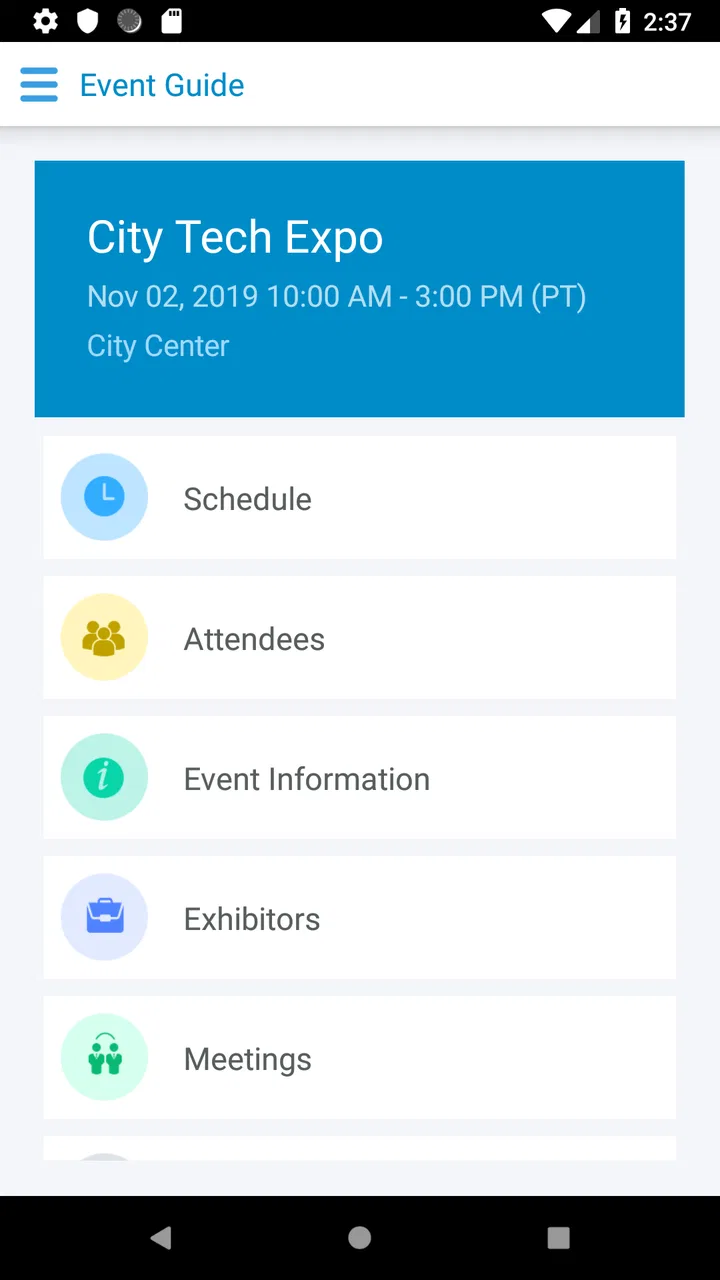
The app makes the most sense when you think of it as a companion for an event rather than a place to discover events. Its store summary focuses on viewing event information and documents, so the useful question is not “What can I do inside the whole events industry?” but “Can I find the schedule, instructions, or files connected to my event without digging through messages?”
That distinction also explains why the app may feel quiet compared with larger event platforms. A broad conference app might include networking feeds, live chat, exhibitor maps, ticket purchases, and personalized recommendations. Eventleaf Guide is more practical when the organizer’s priority is distributing information to attendees. If you only need a timetable or a document, that narrower design can be an advantage because it avoids filling the screen with unrelated activity.
At the same time, the app cannot create useful content by itself. Its usefulness is tied to what the event organizer has prepared and made available. A well-organized event should give you a clear reason to open the app and a small set of relevant materials. A poorly prepared event may leave you wondering where to look, even though the application itself has opened correctly.
For a first-time user, I recommend installing it before you are standing outside a venue or trying to join a session. Give yourself enough time to open the event area, inspect the available information, and identify the pages or documents you are likely to need. This is especially important if your event has several rooms, a long schedule, or instructions that are easier to read calmly at home than during a crowded arrival.
The app is also a better fit for people who prefer a dedicated event space over a collection of email attachments. An email thread can contain useful information, but it is easy for a later update to be buried under replies. A document saved to a phone may be hard to locate when you need it. Eventleaf Guide offers a more focused place to check, provided the organizer has kept the material current.
Who will get the most from it
I see the strongest use case in professional gatherings, training sessions, meetings, and other organized occasions where attendees need reference material rather than constant conversation. If you have received an invitation connected to Eventleaf, this is a sensible app to try before relying on screenshots or printed notes.
It can also help people who move between a phone and a tablet. The store description specifically presents it as usable on either type of device, which suits someone who wants to read event documents on a larger screen but keep a phone available while moving around. I would still check the event material on the device you plan to carry, because a document that looks comfortable on a tablet may require more scrolling on a phone.
On the other hand, I would skip it if you are looking for a universal planner that imports every appointment, manages unrelated bookings, or replaces your normal calendar. I would also prefer a different event platform when the main purpose is active networking, live discussion, or complex ticket management. Eventleaf Guide is most convincing when the organizer has already chosen it as the information doorway for attendees.
From installation to the first useful result
I find the first useful moment comes when I stop exploring and follow one real question from the invitation into the event materials. That gives me a quick way to judge whether the organizer’s information is arranged clearly and whether I can return to it without hunting. With that basic route in mind, it is easier to spot the places where a newcomer may still hesitate.
Start with the event invitation, not with random tapping
After installing the app, keep the original event message nearby. The important starting point is the event reference you were given, not a general exploration of the app. Look for the organizer’s instructions and use the exact event details they supplied. This small habit prevents a common first-time mistake: assuming the app will automatically know which gathering you intend to attend.
If the event does not appear immediately, avoid repeatedly closing and reinstalling the app. First reread the invitation and check whether the organizer expected you to use a particular entry point or event identifier. The app is an attendee viewer, so the organizer’s setup is part of the process. In practical terms, a missing event may be an invitation problem, an event-availability problem, or simply a sign that you have not yet followed the event’s intended route.
Once the event is visible, pause before trying to read everything. I find it more useful to scan the structure first: identify where the main event information sits, where documents are grouped, and whether the material is arranged by session, topic, or another label. This gives you a mental map, which is more valuable than opening every file without knowing what you are looking for.
Make one small test before the event day
Your first meaningful success should be modest: locate one piece of information you will genuinely need later. That might be the opening time, a room instruction, or a document mentioned by the organizer. Finding one useful item confirms that you have entered the correct event and shows you where to return when you are under time pressure.
I would then close the app and reopen it once, using the same normal route you expect to use on the day. This is a simple but overlooked check. It tells you whether you can find the event again without depending on memory from the first session. It also gives you a chance to notice whether the content is easy to navigate or whether you should save a mental note about the relevant section.
The best first setup is not a long tour of every screen; it is a repeatable path to one important document or instruction. That approach keeps the app reassuring for new users and exposes friction early, when there is still time to ask the organizer for help.
Use documents as reference material, not as your only backup
When an event includes documents, read the most important ones before arrival rather than waiting until you need them. Pay attention to practical details such as room names, preparation instructions, or anything you may need to recognize quickly. If a document contains several pages, note the heading or section where your information appears so you do not have to search from the beginning in a busy hallway.
I would not assume that viewing something in the app automatically means you have a permanent offline copy. The safest habit is to open essential material while you have a dependable connection and keep the organizer’s original message available as a backup. This is not a criticism of the app so much as sensible event planning: an attendee viewer is useful, but it should not be your only plan for information that affects your arrival or participation.
Another practical tip is to avoid relying on a screenshot of a schedule as your main reference. A screenshot can become outdated if the organizer changes a detail, while the event area may present the current material. Use the app as the place to check for the latest available information, and keep a personal note only for the items you need to remember quickly.
Turn the app into a quick check-in habit
For a multi-part event, I would open Eventleaf Guide at three sensible moments: before leaving, when arriving, and before a session or activity that matters to me. This rhythm is more useful than constantly refreshing the app. Before leaving, I can review the broad plan. At arrival, I can confirm the practical details. Later, I can return to a specific document instead of browsing aimlessly.
This workflow is particularly helpful for people who dislike carrying printed pages. It also reduces the risk of searching through an email inbox while other attendees are waiting. The app’s narrow purpose becomes a strength here: I am opening it for event information, not being distracted by unrelated notifications or general content.
Where first-time users may become confused
The main learning curve is less about operating the app and more about understanding what the organizer has placed there. I would check labels against the invitation and separate event reference material from tasks such as registration or ticket changes. That distinction helps explain why an attendee may see useful content yet still be unsure what to do next.
An empty or incomplete event area
The most confusing situation is likely to be an event that looks empty or does not contain the material you expected. Do not immediately conclude that the app is broken. Check that you entered the correct event, reread the organizer’s instructions, and verify whether the information was supposed to be published already. Because the content comes from the event setup, the app cannot compensate for an organizer who has not uploaded or released a document.
If you can see some information but not the item you were promised, compare the wording in the invitation with the labels inside the app. Organizers sometimes describe a document using a friendly name while the app displays a more formal section title. Searching by meaning rather than expecting an exact phrase can save time, especially when the event contains several related files.
Confusing the app with a ticket or registration system
Another possible misunderstanding is expecting the app to handle every part of attendance. Its stated role is viewing event information and documents. If your question concerns registration, payment, a booking change, or a personal attendance record, the correct answer may still be in the organizer’s original communication rather than inside the viewer.
This is where a larger event platform may be better. If you need a visible ticket barcode, two-way messaging, exhibitor profiles, or a rich personal agenda, choose the tool that was designed around that task. Eventleaf Guide is not a poor choice simply because it is focused; it is a poor choice only when your event needs go beyond that focus and no companion tool has been provided.
Not knowing whether information has changed
Event details can change, and a document that was correct when you first opened it may not be the latest version later. I recommend checking the relevant event area again before an important appointment instead of trusting an old note. If something appears inconsistent, compare it with the newest organizer message and ask the organizer directly when the difference affects your plans.
This habit also helps with schedules that contain parallel activities. Rather than memorizing the whole program, identify your next decision: where you need to go, what you need to read, or which instruction applies to you. Eventleaf Guide works better as a just-in-time reference than as a place where you endlessly study every available page.
Device and reading comfort
The minimum operating system is Android 8.0, so anyone using an older Android phone should check compatibility before making the app part of an event plan. For supported devices, screen size still matters. Long documents can be comfortable on a tablet and more tiring on a phone, while a phone is easier to carry through a venue. If you have both, use the larger screen for preparation and the phone for quick checks.
I also suggest adjusting your expectations about presentation. An attendee document may be more like an organizer’s handout than a polished interactive guide. If you prefer maps that respond dynamically, live updates, or highly visual navigation, a browser-based event portal or a fuller conference app may feel more natural. The trade-off is that a focused document viewer can be quicker when all you want is one confirmed instruction.
How it compares with ordinary alternatives
Email remains the most obvious alternative, and it is still useful as a backup. It preserves the organizer’s original message and may contain instructions that are not part of the app. However, email is poor at keeping event material together once several updates arrive. Eventleaf Guide gives those materials a dedicated destination, which can reduce searching when the organizer has used it consistently.
A phone’s file manager is another alternative for documents. It can be perfectly adequate if someone sends you a single PDF, but it does not necessarily show the relationship between that file and the wider event information. The app is more convenient when you need context as well as the document, while the file manager is more dependable for files you have deliberately saved for later.
A calendar app is better for protecting time and sending reminders. I would use a calendar for the event’s appointment and Eventleaf Guide for the event’s supporting information. These tools solve different problems, and trying to make one replace the other usually creates confusion. Put the time in your calendar, then consult the attendee app for the material connected to that time.
Full event platforms are stronger when interaction is central. They may be preferable for networking, live questions, attendee profiles, or complicated personal schedules. Eventleaf Guide is the calmer option when the organizer mainly needs to distribute information and documents. Its lower level of activity can feel limited, but it also means less clutter for someone who only wants dependable reference material.
My recommendation after using it as a first-time attendee
I would recommend Eventleaf Guide to anyone whose organizer has specifically chosen it and whose main need is to view event information or documents on a mobile device. The free price removes an obvious barrier, and the Everyone content rating makes it approachable for a broad audience. The developer, Jolly Technologies Inc, has kept the concept clear enough that a new attendee can understand the intended job quickly.
My recommendation comes with a condition: install it early, follow the event instructions carefully, and test one meaningful path before the day begins. Do not wait until you are at the entrance to discover that you have the wrong event, that a document is difficult to locate, or that you need to contact the organizer for access. A few minutes of preparation can turn a basic viewer into a genuinely useful event companion.
The average rating of 3.1 from about two dozen ratings points to a product that may still leave some users frustrated, so I would not describe it as universally polished. The relatively small review history also means I would judge it by the specific event experience rather than by the score alone. If the organizer has supplied clear, well-labeled material, the app can save time. If the event requires richer interaction or complex attendance management, another platform will probably serve you better.
For me, the deciding question is simple: Do I need a focused place to consult this particular event’s information? If the answer is yes, Eventleaf Guide is worth trying. If the answer is that I need a complete event-management experience, I would look for a more comprehensive alternative and keep this app only if the organizer requires it.
Used with that realistic expectation, the app does its most important job well enough: it gives attendees a practical route from the invitation they received to the information they need next. That is not everything an event app could be, but for a first-time user trying to find the right document or instruction without unnecessary fuss, it can be exactly the right amount of help.
FAQs for Eventleaf Guide
01What features does the Eventleaf Guide app offer?
Eventleaf Guide is designed to enhance the experience of event attendees. It provides features such as event schedules, speaker bios, venue maps, and networking tools. Users can customize their agenda, receive real-time updates, and participate in live polls and Q&A sessions. These features aim to streamline event participation and maximize engagement.
02Is the Eventleaf Guide app free to use?
The basic version of Eventleaf Guide is free, allowing users to access essential event details. However, some events may offer premium features that require in-app purchases or a subscription. These premium options typically include advanced networking capabilities, exclusive content, or personalized support, providing a more comprehensive event experience.
03Is Eventleaf Guide available on both Android and iOS?
Yes, Eventleaf Guide is available on both Android and iOS platforms. Users can download the app from the Google Play Store or the Apple App Store, ensuring compatibility with a wide range of smartphones and tablets. This cross-platform availability makes it convenient for all attendees to stay connected during events.
04Can I use Eventleaf Guide offline?
Eventleaf Guide offers limited offline functionality. Users can access previously downloaded schedules and event details without an internet connection. However, features like real-time updates, messaging, and polls require an active internet connection. It is recommended to ensure connectivity for the full range of interactive features during events.
05How does Eventleaf Guide enhance networking at events?
Eventleaf Guide includes networking tools that facilitate connections among attendees. Users can create profiles, view other attendees’ profiles, and schedule meetings directly through the app. The app also supports messaging and social media integration, making it easier to network effectively and build professional relationships during the event.
Pros
- User-friendly interface simplifies navigation.
- Real-time updates keep attendees informed.
- Customizable schedules enhance event planning.
- Seamless integration with calendar apps.
- Networking features boost attendee interaction.
Cons
- Limited offline functionality may hinder use.
- Some features require in-app purchases.
- Initial setup can be time-consuming.
- Limited customization for smaller events.
- Occasional syncing issues with some devices.

Eventleaf Guide
Gallery